User story mapping is a two-dimensional visual technique that arranges user stories along a horizontal backbone of user activities and a vertical axis of priority, giving Agile teams a shared picture of the product instead of a flat, disconnected backlog. It restores the context a spreadsheet or ticket queue erases, which is why teams reach for it at project kickoffs, before building a major feature, or whenever a backlog needs re-sorting around what actually matters to the user.
TL;DR:
- Teams should focus on building the walking skeleton to ensure a usable end-to-end experience, rather than just a list of individual features.
- Revisit and update the user story map regularly, ideally every two to four weeks, to reflect evolving user feedback and project realities.
- Use different slicing approaches like persona-based, outcome-based, or platform-based to align releases with specific goals and avoid strategy mixing.
- Facilitators must include key stakeholders such as product owners, developers, designers, and QA to ensure a comprehensive and accurate map.
- A connected model that covers market and customer insights complements story mapping, especially for small teams validating ideas before significant investment.
Table of Contents
- What Does a Story Map Actually Look Like?
- Why Does Story Mapping Improve Prioritization?
- How Do You Run a User Story Mapping Workshop?
- How Do You Slice a Story Map into an MVP?
- What Are the Most Common Story Mapping Mistakes?
- Story Mapping Examples: E-Commerce, Banking, and Meal Planning
- How Do You Turn the Map into a Sprint-Ready Roadmap?
- Who Should Facilitate a Story Mapping Session?
- How Klaritea Turns a Story Map into a Build-Ready Plan
- The Habit That Separates Useful Maps From Wasted Whiteboard Time
- A Faster Path From Map to Build Spec
- Sources
- FAQ
What Does a Story Map Actually Look Like?
Picture a whiteboard with a row of sticky notes running left to right across the top. That row is the backbone: the big activities a user moves through, like "browse products," "check out," or "track order" in a retail app. Each activity gets its own column of tasks underneath, the smaller steps a user takes to complete that activity.
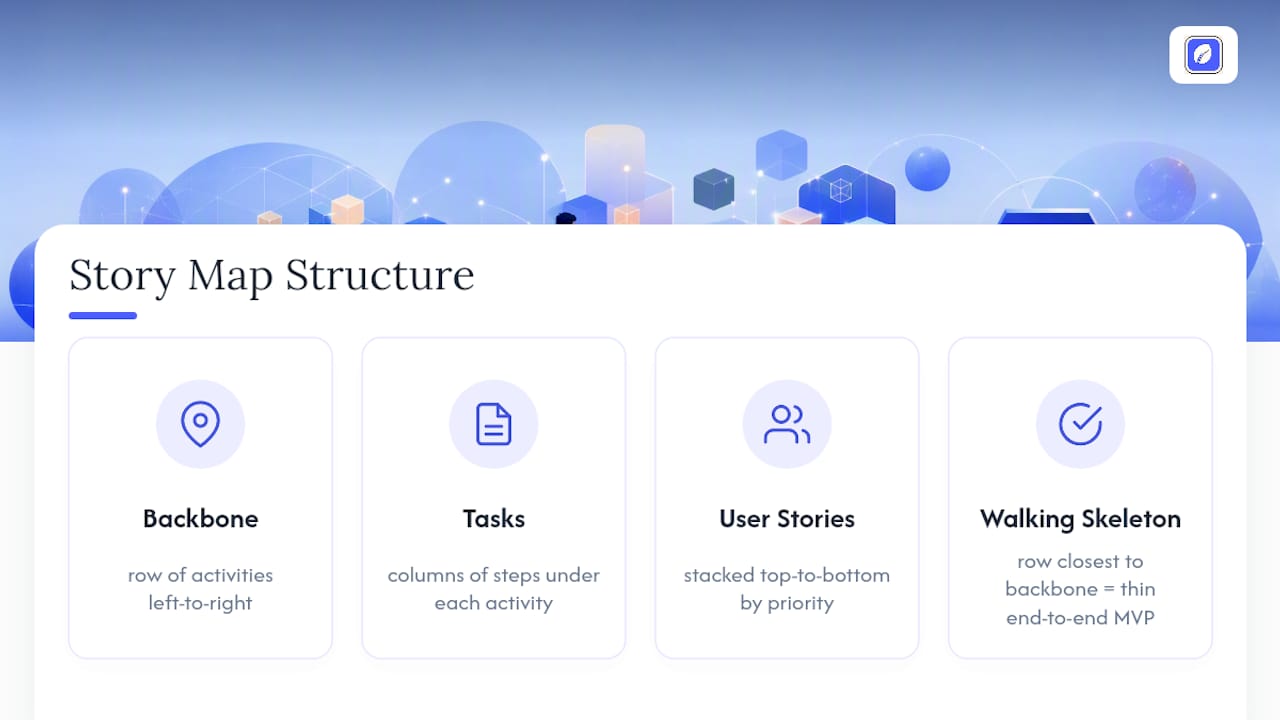
Below the tasks, you stack individual user stories that describe alternative ways someone might accomplish that step. Read the map left to right and you're reading the user's journey in sequence. Read it top to bottom within any column and you're reading priority: the stories near the top are essential, the ones lower down are nice-to-haves you'll build later, if ever.
The row closest to the backbone is called the walking skeleton: the thinnest possible set of stories that lets a user complete the entire journey end to end, even if every individual step is crude. Draw a horizontal line under that row and you've marked your first release.
Why Does Story Mapping Improve Prioritization?
A flat backlog hides the shape of the product. Once fifty tickets pile up in priority order with no visual structure, teams start arguing about individual features instead of the user's actual path through the product. Story mapping fixes this by forcing every conversation back to what the user is trying to accomplish, which is the same shift Jeff Patton built the technique around: moving teams away from feature arguments and toward the journey itself.
That visual clarity has measurable payoff. One e-commerce team mapped its checkout flow and discovered a bottleneck buried in identity verification that nobody had flagged in the backlog.
Once they prioritized fixing it, checkout drop-off rates decreased significantly. That's the kind of gap a story map surfaces and a list of tickets never will, and it's a big part of why Nielsen Norman Group points to story mapping as a way to keep the whole team visible on how features fit together.
How Do You Run a User Story Mapping Workshop?
Before anyone touches a sticky note, nail down three things: the specific goal you're mapping (a whole product, a single feature, a redesign), the primary persona whose journey you're tracing, and who needs to be in the room. Pick your medium: physical wall with sticky notes for co-located teams, or a virtual whiteboard for distributed ones.
Then run the session in four steps:
- Build the backbone first. Get the group to call out the major activities in the user's journey, left to right, without worrying about tasks yet. Silent generation, where everyone writes ideas alone before sharing, surfaces more activities than open discussion.
- Add tasks under each activity. For every backbone item, list the smaller steps a user takes to get through it. Keep this loose. You're mapping the journey, not writing specs.
- Write user stories underneath the tasks. Each story should be short: the "who, what, why" of one specific way to accomplish that task. Resist the urge to write acceptance criteria at this stage.
- Prioritize vertically and draw release lines. Move the most critical stories to the top of each column, then draw a horizontal line marking your walking skeleton and additional lines for future release slices.
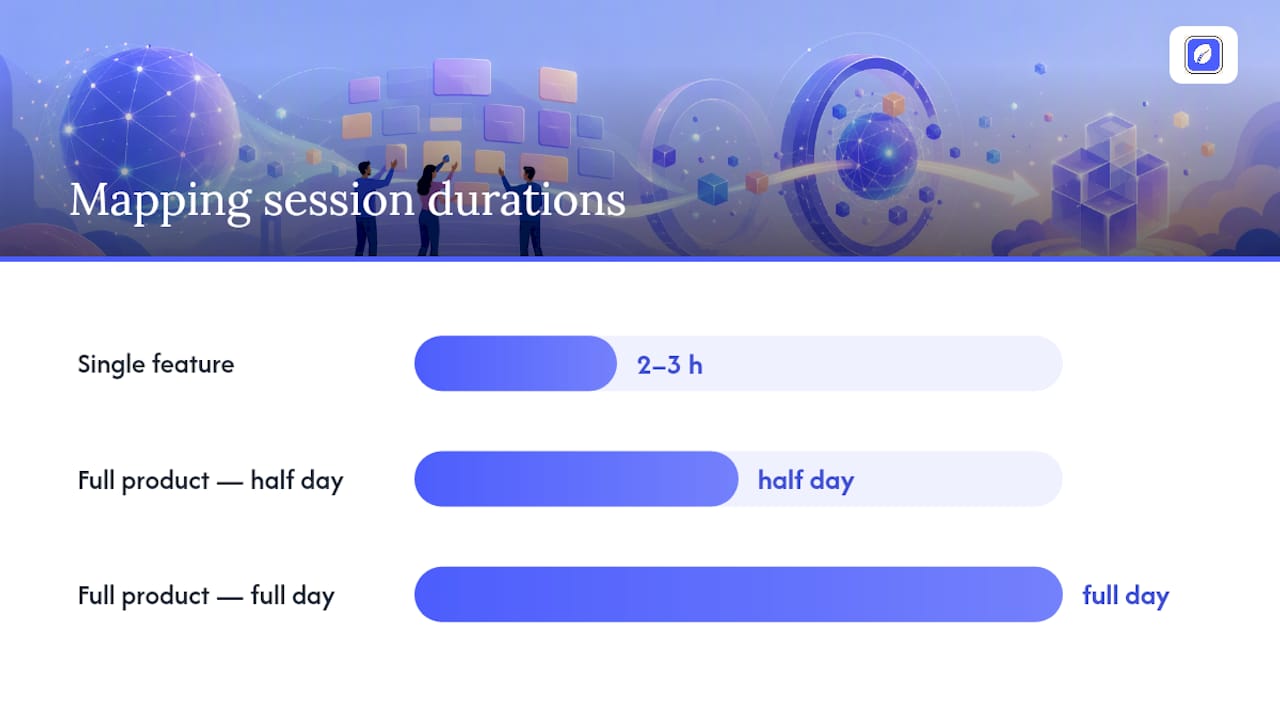
Timebox this. A single feature usually maps in two to three hours; a full product needs a half or full day, often split across sessions to avoid burnout. Walk out with photos or an exported digital board, and a clear plan for who turns the top-priority stories into backlog tickets.
Pro Tip: Do the backbone pass twice. The first draft always skips a step someone assumed was obvious. A second, faster pass catches it before you move into tasks.
How Do You Slice a Story Map into an MVP?
The walking skeleton is your MVP candidate. It's not a fully polished product. It's a thin slice that touches every major activity in the backbone, which matters more than it sounds: a product that handles one activity perfectly and ignores three others isn't testable end to end. A skeleton that stumbles through all four activities is.
Beyond the skeleton, you have a few common slicing strategies to pick from:
- Persona-based slicing builds a full experience for one user type before adding others.
- Outcome-based slicing ships whatever gets a specific business result fastest, regardless of persona.
- Platform-based slicing launches on one channel (say, mobile web) before others.
Whichever strategy fits your goal, converting a slice into work is mechanical: each backbone activity in the slice becomes an epic, and the stories underneath it get refined into sprint-sized tickets. If you need a structured way to lock this scope down before it turns into build time, this guide to defining MVP scope walks through the tradeoffs.
Pro Tip: Never mix slicing strategies inside the same release line. Combining "build persona A's full journey" with "ship the fastest outcome" in one slice muddies your prioritization logic and makes the next release line harder to draw.
What Are the Most Common Story Mapping Mistakes?
Teams derail their own maps in a few predictable ways.
- Mapping the system instead of the user. If your backbone reads like a list of backend services, you've reframed the map around your architecture instead of the user's outcome, and priority calls start favoring what's easy to build over what users actually need.
- Overloading the map with detail too early. Piling in every edge case during the first pass creates clutter that buries the real priorities. Start broad, add detail later.
- Skipping the walking skeleton entirely. Without a defined thin slice, teams default to building whatever feels most finished first, which usually isn't the same as most valuable.
- Treating the map as a one-time artifact. A map drawn once at kickoff and never revisited stops reflecting reality within a sprint or two.
Revisit the map on a fixed cadence rather than letting it fossilize on a wall.
Story Mapping Examples: E-Commerce, Banking, and Meal Planning
Concrete patterns travel faster than abstract advice. In practice, the strongest maps mirror a user's real-world steps closely, which is why these three examples read almost like a script.
- E-commerce: Backbone runs browse, product detail, cart, checkout, order tracking. The tasks under "checkout" might include applying a discount code, choosing shipping, and confirming payment. The MVP slice covers guest checkout only, with account creation deferred.
- Banking: Backbone covers login, view accounts, transfer funds, pay bills, get support. Tasks under "transfer funds" include choosing an account, entering an amount, and confirming with two-factor authentication. The walking skeleton often ships internal transfers before external ones.
- Meal planning: Backbone covers browse recipes, build a weekly plan, generate a grocery list, check off items while shopping. The MVP slice frequently skips nutritional tracking and starts with a bare recipe search and list export.
For any of these, keep one map for the core journey and spin off a submap only when a single activity (like payment processing) grows complex enough to need its own detailed session.
How Do You Turn the Map into a Sprint-Ready Roadmap?
A map that stays on a wall is a wasted afternoon. The real work starts when you move it into a system your team already uses.
- Convert each release slice into a backlog epic, then break its stories into sprint-sized tickets your team can actually estimate.
- Treat the walking skeleton as your first sprint's input. It's already scoped thin enough to be achievable and it forces the team to touch every part of the journey immediately.
- Revisit the map every two to four weeks or immediately after a significant user research finding, rather than letting it sit static for a whole quarter.
If you're sequencing multiple release lines into a public-facing plan, a release planning guide built for first launches covers how to stagger those slices without overcommitting your first sprint.
Who Should Facilitate a Story Mapping Session?
Get the right people in the room and the session runs itself. You need a product owner who can make priority calls on the spot, a facilitator to keep the pace moving, at least one developer to flag technical constraints early, a designer if the flow touches UI, and QA to catch edge cases before they become bugs later.
- Book two to four hours for a single feature; reserve a full day for a whole product, split across sessions if the scope is wide.
- Virtual sessions work fine with a shared whiteboard tool, provided someone owns exporting the finished stories into your ticketing system before the meeting ends.
- Skip stakeholders who can't commit to the full session. Partial attendance produces gaps in the map nobody notices until sprint planning.
How Klaritea Turns a Story Map into a Build-Ready Plan
A story map tells you what to build and in what order. It doesn't validate whether the market wants any of it. Klaritea sits in that gap: you describe your idea in one line, and it builds a connected model covering your ideal customer, market sizing, competitors, and features, alongside clarity scorecards that flag risky assumptions before they hit a sprint.
Its AI advisory board, three advisors covering marketing, business strategy, and operations, applies frameworks like Jobs to Be Done to pressure-test your backbone before you draw a single release line. From there, outputs export straight into a build spec, GitHub, or Notion, so the walking skeleton you mapped on a whiteboard becomes something a developer can actually pick up.
The Habit That Separates Useful Maps From Wasted Whiteboard Time
The best mapping sessions I've seen on paper and in case studies share one habit: they never end without an agreed walking skeleton drawn on the board, in ink, before anyone leaves the room. Teams that skip this step often walk away with a beautiful map and no shared answer to "what are we building first," which defeats the entire point.
Treat the map as a draft you'll redraw, not a monument. Revisit it after every meaningful round of user feedback, and it'll keep earning its place on the wall.
— Karl
A Faster Path From Map to Build Spec
A story map gets your team aligned on what to build. It doesn't tell you whether the market wants it, how big the opportunity actually is, or what a competitor is already doing better. Klaritea picks up right where the whiteboard leaves off: type your idea as one line, and it builds a connected model spanning your ideal customer profile, market sizing, competitor landscape, and a feature list you can map stories against from day one.
Founders and small product teams get the most out of it, especially anyone about to spend real money building before validating the idea. The AI advisory board challenges weak assumptions before they become expensive sprints, and every output, from clarity scorecards to a full build spec, syncs to GitHub or exports to Notion. If you've got a rough idea and a whiteboard full of sticky notes, start turning it into a shipped product and see what the connected model surfaces that your map didn't.
Sources
- Mapping user stories in Agile (Nielsen Norman Group)
- What is user story mapping? (Visual Paradigm)
- User Stories: How to Create Story Maps (Mountain Goat Software)
- What is user story mapping? (Miro)
FAQ
What Is User Story Mapping?
It's a visual technique that arranges user stories along a horizontal backbone of user activities and a vertical axis of priority, giving teams a shared picture of the whole journey instead of a flat backlog.
What Are the Three C's of User Stories?
The three C's, card, conversation, and confirmation, describe a user story's lifecycle: it starts as a short written card, gets refined through team conversation, and closes with confirmation criteria that define when it's done.
Can You Give an Example of User Story Mapping?
An e-commerce team might map browse, cart, checkout, and order tracking as its backbone, then stack specific stories like "apply a discount code" or "choose express shipping" underneath checkout, prioritized top to bottom.
What Does a Finished Story Map Look Like?
A finished map shows a row of major activities across the top, columns of tasks beneath each one, and stacked user stories in priority order, with horizontal lines marking the walking skeleton and later release slices.
How Long Does a Story Mapping Workshop Take?
A single feature typically maps in two to three hours, while a full product usually needs a half day or full day, often split into multiple sessions to keep the group focused.