User stories and requirements are not the same thing, and treating them as interchangeable is how backlogs turn into guesswork. Stories capture user intent and spark the conversation that reveals real scope; requirements and specs handle the detail, traceability, and compliance work stories were never built to carry. Acceptance criteria and epics are the bridge between the two. If your team only writes stories, add a spec where it counts. If your team only writes specs, start slicing them into stories before your next sprint.
TL;DR:
- User stories should be complemented with detailed specifications in regulated industries to ensure auditability and compliance.
- Acceptance criteria serve as the testable conditions that align stories with formal requirements and critical system behaviors.
- Most teams over-specify stories by adding excessive detail early, which hampers agility and effective conversation.
- Use a hybrid approach: keep a lightweight, versioned spec for compliance-critical parts and use stories for iterative, user-facing work.
- Proper traceability requires linking each story to a requirement ID, especially when handling non-functional requirements and complex workflows.
Table of Contents
- User Stories vs Requirements: Definitions and Formats
- Requirements vs User Stories: A Head-to-Head Comparison
- How Acceptance Criteria Preserve Requirements Rigor
- When to Use User Stories vs Formal Requirements
- Converting Requirements Into Sprint-Ready Stories
- Regulated Systems and Hybrid Requirements
- Why Most Teams Over-Specify Stories (And What to Do Instead)
- Sources
- FAQ
User Stories vs Requirements: Definitions and Formats
A user story follows a specific template for a reason: As a [user], I want [goal], so that [benefit]. That third clause, the "so that," is the part most teams skip, and it's the part that actually explains why the work matters. A traditional requirement reads differently: The system shall [specific behavior]. No user, no motivation, just a testable statement of system behavior.
Requirements themselves split into a few standard types:
- Business requirements describe the strategic "why" behind a project, often at the level of a company goal or market need.
- Functional requirements describe "how" the system behaves to satisfy that goal, and in Agile practice these usually resurface as acceptance criteria rather than standalone documents.
- Non-functional requirements (NFRs) cover performance, security, and reliability constraints that cut across multiple stories.
Two heuristics keep stories from becoming vague placeholders. The 3 C's, Card, Conversation, Confirmation, describe how a story should work in practice: the card is the short written prompt, the conversation is where the team and stakeholders actually hash out meaning, and confirmation is the acceptance criteria that prove it's done. INVEST (Independent, Negotiable, Valuable, Estimable, Small, Testable) is the quality checklist that tells you whether a story is sprint-ready or needs to be split further.
Pro Tip: A story that fails the "Testable" part of INVEST almost always has acceptance criteria that are too vague to act as a real requirement substitute. Fix the criteria before you fix the story.
An acceptance criterion like "Given a logged-in user with an expired card on file, when they attempt checkout, then the system displays a payment update prompt before allowing the order to submit" reads almost exactly like a functional requirement. That overlap is intentional, not accidental.
Requirements vs User Stories: A Head-to-Head Comparison
Scope is the first place these two diverge. A requirement lives inside a document, a Business Requirements Document (BRD) or Functional Requirements Document (FRD), that describes a complete system or feature set and tends to stay fixed once signed off. A user story lives inside a backlog, gets sliced from an epic, and is explicitly meant to change as the team learns more. One is built for stability. The other is built for iteration.
Ownership shifts too. In most Agile teams, the product owner writes and prioritizes stories, adding detail in refinement sessions rather than up front. Business analysts, where the role still exists, often draft the epic-level requirement or the business case that the stories trace back to. Developers, meanwhile, are the ones who actually surface the acceptance criteria gaps, usually mid-sprint, when an edge case nobody wrote down suddenly matters.
Common traps show up in almost every team that switches from waterfall documentation to story-based backlogs:
- Treating the story title as the whole requirement. The card is a placeholder for a conversation, not a substitute for one, and skipping the conversation is exactly the misconception Mountain Goat Software calls out when it notes that detail in Agile is deferred, not eliminated.
- Writing acceptance criteria after the sprint starts. By then the developer has already made assumptions, and those assumptions are now baked into the code.
- Losing the business rationale between epic and story. A story that no longer connects to a clear business outcome is a sign the epic-level "why" got lost in translation.
Testability is where the two formats actually reconcile. A well-written requirement is testable by definition; a well-written story becomes testable the moment its acceptance criteria are attached. The failure mode is the same in both worlds: ambiguous language that two people can read two different ways.
How Acceptance Criteria Preserve Requirements Rigor
Acceptance criteria are doing the job a functional requirement used to do, just attached to a smaller unit of work. Each story's criteria describe the specific, testable conditions that must hold true for the story to count as done, and that's functionally the same output a requirements document would have produced, just written closer to delivery.
The backlog hierarchy that makes this traceable usually looks like this:
- Strategic goal or business requirement sets the "why" at the company level.
- Epic breaks that goal into a large, coherent chunk of user-facing or system-facing value.
- User story slices the epic into something a team can build in a sprint.
- Acceptance criteria define exactly what "done" means for that story.
Non-functional requirements are the part teams most often drop on the floor during this process. There are three reasonable places to put them: baked into the acceptance criteria of the relevant stories, written as their own dedicated NFR stories (common for things like "page load under 2 seconds" or "supports 10,000 concurrent sessions"), or documented in a lightweight cross-cutting spec that every relevant story links back to. The IIBA's guidance on handling requirements within stories points out that significant NFRs often need that separate handling because they don't fit cleanly inside a single story's acceptance criteria.
Pro Tip: Add a custom "Requirement ID" field to your issue tracker and populate it on every story that traces back to a formal spec. It costs thirty seconds per story and saves hours during an audit.
Most issue trackers, Jira and Azure DevOps included, support link types like "relates to" or "implements" specifically for this. Use them consistently and a traceability matrix becomes a query instead of a spreadsheet you rebuild by hand.
When to Use User Stories vs Formal Requirements
The decision usually comes down to four signals: regulatory exposure, integration complexity, team maturity, and how fast user feedback needs to loop back into the product.
- Favor formal requirements when you're building against an audit trail, a cross-system contract (an API another company depends on), or a hard performance SLA. Aha!'s product guidance draws this line clearly: use stories for direct user-facing benefit and requirements for infrastructure, security, or core system work that has no single "user" to write a story from.
- Favor user stories when the work is UX-driven, the requirements are still fuzzy, and rapid feedback from real usage will shape the next iteration more than any spec written today could.
- Favor a hybrid when you have both, which describes most mid-size product teams. Keep a short, versioned spec for the parts that need to be stable and auditable, and let stories handle everything downstream of that.
Use cases fit into this decision too. Visual Paradigm's comparison frames use cases and stories as complementary rather than competing: a use case maps the full interaction at an architectural level, then gets sliced into the smaller stories a sprint can actually absorb. Teams building complex workflows, checkout flows, multi-role permission systems, often need that use-case layer before stories make sense at all.
The hybrid pattern that preserves traceability without reviving your old change-control process: write the epic with its business outcome stated in one sentence, link every story underneath it to that epic, and attach a requirement ID to any story that touches a compliance or integration boundary.
Converting Requirements Into Sprint-Ready Stories
Start with a requirement that already exists, maybe pulled from an old BRD, a stakeholder email, or a compliance mandate, and work it into something a sprint can actually consume using a templates library of reusable structures.
- Identify the actor, goal, and reason. Every requirement has an implicit "who" and "why" even when it's written in passive voice. Pull those out first.
- Write the epic. State the business outcome in one sentence: what changes for the user or the business once this is live.
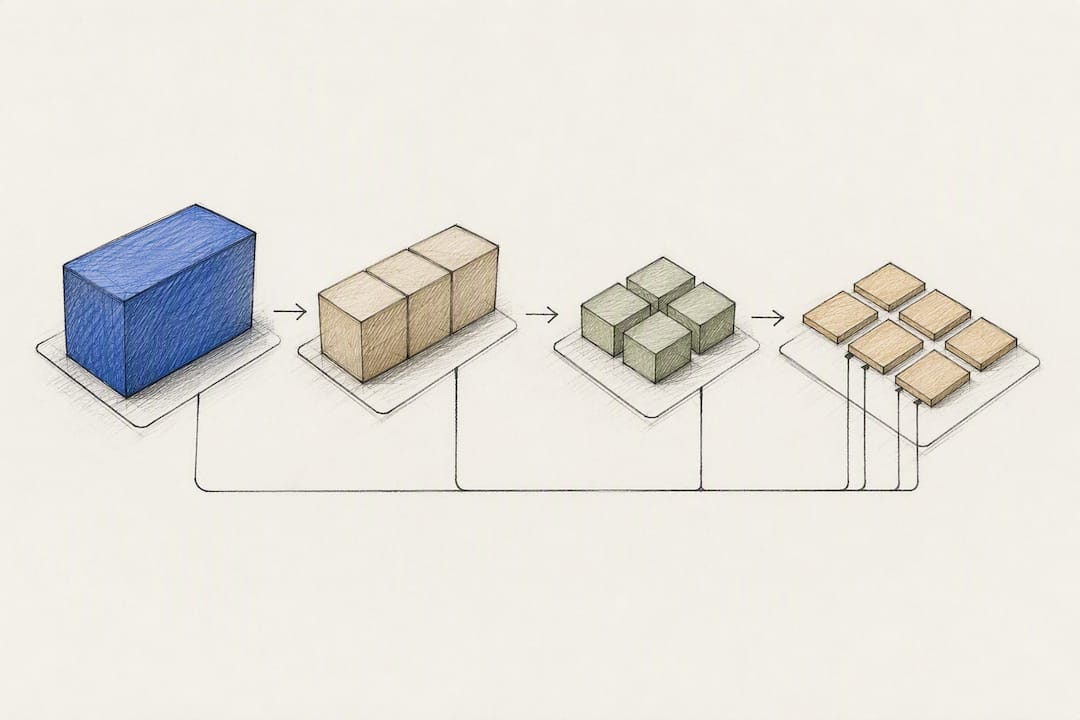
- Slice the epic into stories. Each story should represent one thin, independently valuable slice of that outcome, not a technical task.
- Attach acceptance criteria to each story, written in Given/When/Then format where it fits, so each one is testable on its own.
- Tag NFRs and link back to the source requirement using whatever trace field your tracker supports.
A worked example: the original requirement reads, "The system shall allow registered users to reset their password via email verification within 5 minutes." That becomes an epic, Password Recovery, sliced into three stories: "As a registered user, I want to request a password reset link so that I can regain account access," "As a registered user, I want to receive a time-limited reset link so that my account stays secure," and "As a registered user, I want to set a new password after clicking the link so that I can log back in." Each carries its own acceptance criteria, including the 5-minute delivery window from the original requirement, so nothing from the source spec actually gets lost. This kind of slicing is also where structured story mapping earns its keep, especially before a team has committed to a full sprint plan.
Pro Tip: Keep a "DONE WHEN" line at the bottom of every story as a plain-language summary of its acceptance criteria. Stakeholders read it faster than a Given/When/Then block.
Attach the original requirement as a linked document or comment rather than retyping it. That single habit prevents the slow drift where a story's acceptance criteria quietly stops matching the spec it came from.
Regulated Systems and Hybrid Requirements
Stories alone fall short in regulated industries because auditors and compliance reviewers need something a rotating backlog can't reliably provide: a stable, dated record of what the system was required to do at a given point in time. Healthcare, finance, and aerospace teams in particular need documentation that supports audit trails, non-functional performance thresholds, and clearly defined system boundaries, and pure story-based tracking tends to fall short of that bar on its own.
The workaround isn't abandoning Agile. It's keeping a minimal, versioned specification document alongside the backlog and linking every relevant story back to a specific requirement ID inside it.
A practical compliance checklist for teams in this position:
- Maintain one lightweight, versioned spec document per regulated feature area, not per story.
- Assign a stable requirement ID to every clause in that spec.
- Link every story that touches a regulated behavior back to its requirement ID.
- Record NFRs (performance, security, retention) in the spec, not scattered across acceptance criteria.
- Review the spec at each major release, not every sprint.
Dedicated use-case specs still earn their place when a workflow spans multiple systems or user roles in ways a single story can't represent cleanly.
Why Most Teams Over-Specify Stories (And What to Do Instead)
The failure mode I see most often isn't teams writing requirements when they should write stories. It's teams writing stories that quietly turn into requirements documents, three paragraphs of acceptance criteria trying to cover every edge case up front, because someone got burned once by an ambiguous story. That instinct kills the exact thing stories are good for: fast, honest conversation about what the user actually needs.
Keep the "why" visible at the epic level, always, in one sentence you could say out loud. Let stories stay small and slightly underspecified until refinement fills the gaps. Only stop and write a real spec when you hit an integration boundary, a compliance requirement, or an architectural constraint that another team depends on. Everything else can stay a conversation.
— Karl
Sources
For deeper background, Scrum.org's blog on whether user stories are requirements is the clearest starting point. Visual Paradigm's guides on the 3 C's and INVEST and on use cases vs stories cover the practical mechanics well. For requirements-side detail, Klaritea's own guide to building a feature requirements list walks through the same conversion process from the opposite direction.
Before writing your next epic, it's worth structuring the whole business model first, so the stories you slice actually trace back to a validated market need rather than a guess. That's the gap Klaritea's phase-0 planning approach is built to close: a connected model covering scope, competitors, and features before a single story gets written, so the build spec that comes out the other end already has its requirements baked in.
- 3C and INVEST guide | Visual Paradigm
- Short answers about user stories | Mountain Goat Software
- User stories vs use cases: When to use which | Visual Paradigm
- Tips for writing effective user stories — handling requirements | IIBA
FAQ
Are user stories the same as requirements?
No. User stories capture user-centered intent and prompt a conversation; requirements are detailed specifications of system behavior, and Scrum.org is explicit that the two aren't interchangeable.
What is the difference between user stories and business requirements?
Business requirements state the strategic "why" behind a project, usually at the company or market level, while user stories describe a specific, user-facing "what" that delivers a slice of that value in a sprint.
What are the three C's of user stories?
Card, Conversation, and Confirmation: the card holds the brief story text, the conversation builds shared understanding between the team and stakeholders, and confirmation is the acceptance criteria that proves the story is done.
What are the four types of requirements?
Most frameworks group requirements into business, functional, non-functional, and (in Agile teams) acceptance criteria, which function as the testable expression of functional requirements at the story level.
Can user stories replace formal requirements entirely?
Not reliably. Stories work well for iterative, user-facing features, but regulated systems, cross-system integrations, and hard performance SLAs generally need a lightweight spec alongside the backlog to satisfy audit and traceability needs.