A feature requirements list is the single-source inventory of testable feature entries that connects each capability to its acceptance tests, its owner, and its release gate. Without one, engineering builds to assumptions, QA tests the wrong thing, and product ships features nobody can measure.
Here is a one-line template entry you can paste into a PRD or tracking sheet right now:
FR-001 | User login via email | As a returning user, I want to log in with email and password so I can access my account | Given valid credentials, when I submit the form, then I am redirected to my dashboard | Must-Have | Auth team | 3 pts | Depends: FR-002
Every feature entry needs at minimum:
- ID — unique, prefixed identifier (e.g.,
FR-001) - Title — a short, scannable label
- User story — "As a [persona], I want [action] so that [outcome]"
- Acceptance criteria — Gherkin-style Given/When/Then statements
- Priority — MoSCoW or numeric tier
- Owner — the person accountable for delivery
- Estimate — story points or hours
- Dependencies — IDs of blocking or related entries
Pro Tip: Write acceptance criteria before you write a single line of code. A criterion that cannot be expressed as a test is not a requirement — it is a wish. Testable NFRs (e.g., "p95 response time under 300 ms") catch ambiguity at definition time, not during QA, which is where rework gets expensive.
Key Takeaways
A feature requirements list only works when every entry is testable, owned, and traceable from requirement to release.
| Point | Details |
|---|---|
| Minimum viable entry | Every feature needs an ID, user story, Gherkin acceptance criteria, priority, owner, and a success metric before it enters a sprint. |
| NFRs must be measurable | Attach NFR IDs with numeric thresholds (e.g., p95 ≤ 300 ms) to every user-facing feature; "fast" and "reliable" are not testable. |
| Traceability chain | Link each requirement ID to a Jira/GitHub story, a test case ID, and a release note to prove the feature shipped and met its criteria. |
| Prioritize with VCE scoring | Score features on Value, Confidence, and Effort; convert high-Value, low-Confidence items into experiments before committing sprint capacity. |
| Klaritea for early-stage teams | Klaritea generates a structured feature list with acceptance criteria and NFR stubs from a one-line idea, with export to Confluence, Notion, and GitHub. |
Table of Contents
- What does a feature requirements list template look like?
- How do you write a feature requirements list step by step?
- What is the difference between functional and non-functional requirements?
- What fields should every feature entry include?
- Real-world feature requirement examples across product types
- Common mistakes that create rework in a feature requirements list
- How do you validate requirements and maintain traceability?
- Where should you store and share your feature requirements?
- How should you prioritize features on the requirements list?
- What actually makes a feature requirements list work in practice
- Klaritea turns a one-line idea into a structured feature list
- Sources
- FAQ
What does a feature requirements list template look like?
The table below is a minimal, paste-ready feature entry. Copy it into Confluence, Notion, or a CSV import for Jira.
| Field | Example value |
|---|---|
| ID | FR-004 |
| Title | Guest checkout |
| User story | As a first-time buyer, I want to check out without creating an account so I can complete my purchase faster. |
| Acceptance criteria | Given I am on the cart page and not logged in, when I click "Check out as guest," then I complete payment without being prompted to register. |
| NFR IDs | NFR-PERF-001, NFR-SEC-002 |
| Priority | Must-Have |
| Owner | @product-lead |
| Test owner | @qa-lead |
| Estimate | 5 pts |
| Dependencies | FR-003 (cart), FR-007 (payment gateway) |
| Status | Draft |
| Metric | Guest checkout completion rate ≥ 80% |
A quick-start entry covers ID, title, user story, priority, and owner — enough to triage and assign. An engineering-ready entry adds acceptance criteria, NFR IDs, test owner, estimate, dependencies, and a success metric. Move from quick-start to engineering-ready during sprint grooming, not during discovery.
Pro Tip: Add a "test owner" field to every entry from day one. When QA and engineering share a single named person responsible for test coverage, traceability gaps close before they become release blockers.
How do you write a feature requirements list step by step?
The six-step process
- Capture the idea. Log every candidate feature with a title and a one-sentence problem statement. Use a lightweight intake form or a Confluence page so nothing lives only in Slack.
- Identify the user and persona. Name the persona who benefits. "All users" is not a persona. Tie the feature to a specific ICP segment and their job-to-be-done.
- Write the user story. Follow the standard format: "As a [persona], I want [action] so that [outcome]." Keep it to one sentence. If you need two sentences, you have two stories.
- Add acceptance criteria and NFRs. Write at least two Given/When/Then statements per feature. Attach measurable NFR IDs (performance, security, accessibility). Functional requirements define what a system must do: operations, workflows, UI behavior, data formats; while NFRs define how well it does it.
- Add dependencies, metrics, and estimate. List blocking feature IDs, the success metric the feature moves, and a story-point estimate. A feature without a metric is a feature you cannot declare done.
- Review and sign-off. Route the entry through product, tech lead, QA, and UX. Each role signs off on their slice: product on the story, tech lead on the estimate and dependencies, QA on the acceptance criteria, UX on the interaction assumptions.
Roles and what each person must contribute
- Product manager — owns the user story, priority, and success metric
- Tech lead — confirms estimate, flags technical dependencies, and notes architectural constraints
- QA engineer — writes or validates acceptance criteria and assigns the test owner field
- UX designer — confirms the interaction model and flags any missing edge-case states
- Stakeholder reviewers — approve priority and confirm the feature aligns with the release goal
Cadence that keeps the list current
Triage new intake weekly (15 minutes, product-only). Run grooming every sprint to move quick-start entries to engineering-ready. Freeze the list two weeks before a release so QA has stable targets. Anything that arrives after the freeze goes into the next cycle unless it is a critical defect.
Pro Tip: Before your first grooming session, run a 30-minute assumption-mapping exercise. List every assumption baked into the top five features, assign an owner to each, and mark the riskiest ones as experiments. This prevents analysis paralysis and surfaces the unknowns that would otherwise stall engineering mid-sprint.
What is the difference between functional and non-functional requirements?
Functional requirements describe what a feature does: the operations it performs, the data it accepts, the UI behavior it produces, and the validation rules it enforces. A functional requirement for a search feature might read: "The system shall return results matching the user's query within the current product catalog."
Non-functional requirements describe how well the feature performs. They cover performance, security, availability, accessibility, maintainability, and scalability. The critical distinction is that NFRs apply across features — a single NFR-PERF-001 entry ("p95 API response time ≤ 300 ms") can be referenced by twenty feature entries without being rewritten twenty times.
Non-functional requirements are most useful when pinned to measurable thresholds — "page load within 2 seconds" and "99.9% uptime" are testable; "fast" and "reliable" are not.
| Dimension | Functional example | Non-functional example |
|---|---|---|
| Search | Return results matching the query | p95 search response ≤ 500 ms |
| Authentication | Validate email + password on login | Failed login locked after 5 attempts |
| Checkout | Calculate tax based on shipping address | Payment page loads in ≤ 1.5 s on 4G |
| Dashboard | Display KPIs filtered by date range | Dashboard renders with 10,000 rows in ≤ 2 s |
| File upload | Accept PDF, PNG, JPEG up to 10 MB | Virus scan completes before file is stored |
Converting vague NFRs into testable statements
The most common NFR failure is leaving the threshold open: "the system should be responsive." Convert every NFR using this pattern: [metric] [operator] [threshold] [condition]. "Fast search" is not.
Use percentile thresholds rather than averages. A p95 threshold catches the slow tail that averages hide — and that tail is what users actually complain about. For API performance targets, p99 latency is the standard benchmark in production monitoring.
Pro Tip: Label NFRs with category prefixes — NFR-PERF-001, NFR-SEC-002, NFR-ACC-003 — so any feature entry can reference them by ID. This keeps the list DRY and makes traceability trivial: one NFR ID links to every feature that inherits it.
What fields should every feature entry include?
The schema below covers the canonical set. Fields marked M are mandatory for an engineering-ready entry; fields marked O are optional at the quick-start stage but required before development begins.
ID naming conventions
Use a category prefix plus a sequential number: FR- for functional requirements, NFR-PERF- for performance, NFR-SEC- for security, NFR-ACC- for accessibility. This makes cross-referencing instant and prevents ID collisions when multiple teams contribute entries.
Acceptance criteria in Gherkin
Gherkin format keeps criteria unambiguous and directly mappable to automated tests:
- Given [precondition or system state]
- When [user action or system event]
- Then [expected outcome, measurable where possible]
Write at least two criteria per feature: one for the happy path and one for a failure or edge case. Reference the feature's NFR IDs in the criteria where the threshold applies ("Then the file downloads within 3 s per NFR-PERF-001").
The status field follows a fixed lifecycle: Draft (being written) → Review (circulated for sign-off) → Approved (all roles signed) → In Development (sprint-active) → Done (shipped and metric confirmed).
Real-world feature requirement examples across product types
Web checkout: guest payment
- ID: FR-021
- User story: As a first-time buyer, I want to pay without registering so I can complete my order in under two minutes.
- Acceptance criteria (happy path): Given I am on the cart page and unauthenticated, when I select "Guest checkout," then I reach the payment form without a registration prompt.
- Acceptance criteria (failure): Given my card is declined, when I submit payment, then I see a specific error message and my cart is preserved.
- NFR: NFR-PERF-001 — payment page loads in ≤ 1.5 s on a 4G connection.
- Metric: Guest checkout completion rate ≥ 80%.
Mobile onboarding: permission request
- ID: FR-034
- User story: As a new mobile user, I want to understand why the app needs location access before I grant it so I can make an informed decision.
- Acceptance criteria (happy path): Given I open the app for the first time, when the permission prompt appears, then a one-sentence explanation of the use case is displayed above the system dialog.
- Acceptance criteria (denial): Given I deny location access, when I proceed, then core features remain accessible and location-dependent features are gracefully degraded.
- NFR: NFR-ACC-001 — permission explanation text meets WCAG 2.1 AA contrast ratio.
- Metric: Permission grant rate ≥ 65% in first-session cohort.
Internal reporting dashboard: date-range filter
- ID: FR-047
- User story: As an operations analyst, I want to filter the KPI dashboard by a custom date range so I can compare performance across any two periods.
- Acceptance criteria (happy path): Given I select a start and end date, when I apply the filter, then all dashboard widgets update to reflect only data within that range.
- Acceptance criteria (edge case): Given I select an end date earlier than the start date, when I apply the filter, then an inline validation error prevents the query from running.
- NFR: NFR-PERF-002 — dashboard renders with up to 10,000 rows in ≤ 2 s.
- Metric: Filter usage rate ≥ 40% of weekly active analysts.
Feature specs that include Given/When/Then acceptance criteria, API changes, edge cases, and a rollout plan give engineering everything needed to implement and test without a follow-up meeting.
Common mistakes that create rework in a feature requirements list
The fastest way to spot a weak requirements list is to look for these patterns:
- Vague verbs. "The system should handle errors gracefully" means nothing to a QA engineer. Replace with: "Given a 500 server error, when the user submits the form, then a user-readable message appears and the error is logged with a correlation ID."
- Missing acceptance criteria. A user story with no Given/When/Then is a wish, not a requirement. Every entry needs at least two criteria before it enters a sprint.
- No owner. An entry with no named owner gets deprioritized silently. Assign a product owner and a test owner before the entry leaves Draft status.
- Skipped NFRs. Functional requirements without NFR IDs produce features that work but perform poorly. Attach at least one NFR ID to every entry that touches a user-facing interaction.
- No traceability to metrics. A feature without a success metric cannot be declared done. The metric field is what separates a shipped feature from a shipped assumption.
- Mixed UX opinion and requirements. "The button should be blue and prominent" is a design decision, not a requirement. Requirements describe behavior and outcomes; design artifacts describe appearance.
- Open-ended scope. Phrases like "and other related actions" or "as needed" are scope-creep traps. Every requirement must have a clear boundary.
How to fix each during review
Run a quick linting pass before grooming: search the list for words like "should," "might," "appropriate," "user-friendly," and "fast." Each hit is a candidate for rewriting. Tools like Jama Software's EARS archetypes provide structured sentence patterns (ubiquitous, state-driven, optional, unwanted behavior) that eliminate most ambiguity at the drafting stage.
Pro Tip: Build a one-page "requirements grammar" doc for your team — a list of banned words and their testable replacements. Paste it into your Confluence PRD template so every writer sees it before they start. This takes 30 minutes to create and saves hours of grooming debate.
How do you validate requirements and maintain traceability?
Validation is not a QA-only activity. It starts the moment a requirement is written and runs through to the release note.
The validation flow
- Acceptance criteria review. Product and QA read each criterion together and confirm it is testable, unambiguous, and covers at least one failure path.
- Test case creation. QA maps each criterion to a named test case with a test case ID. The test case ID is added to the feature entry.
- Automated test linkage. Where possible, the test case maps to an automated test in the CI pipeline. The test file path or test ID is recorded.
- Release checklist gate. Before a feature ships, the release checklist confirms: all acceptance criteria have a passing test, the NFR thresholds have been measured, and the success metric has a baseline.
Minimal traceability approach
A traceability matrix does not need to be a separate spreadsheet. A single column in the feature entry works:
FR-021→ Jira storyPROJ-441→ test casesTC-210, TC-211→ release notev2.4.0
This chain means any stakeholder can follow a feature from its requirement to its test to its release, without hunting across tools.
QA and release sign-off checklist
- All acceptance criteria have a corresponding test case ID
- All NFR thresholds have been measured in staging (not just assumed)
- The test owner has confirmed passing status
- The success metric has a pre-launch baseline recorded
- Edge cases and failure paths have been tested
- The feature flag or rollout plan is documented (for phased releases)
A well-structured PRD includes open questions and dependencies in addition to acceptance criteria — leaving those fields blank is a sign-off blocker, not an oversight to fix post-launch.
Pro Tip: Keep the "test owner" field in the requirement entry itself, not in a separate test plan. When the person who wrote the acceptance criteria and the person who owns the tests are visible in the same row, handoff friction drops to near zero.
Where should you store and share your feature requirements?
Storage is not a neutral decision. The tool you choose determines how well requirements survive team growth, tool migrations, and release cycles.
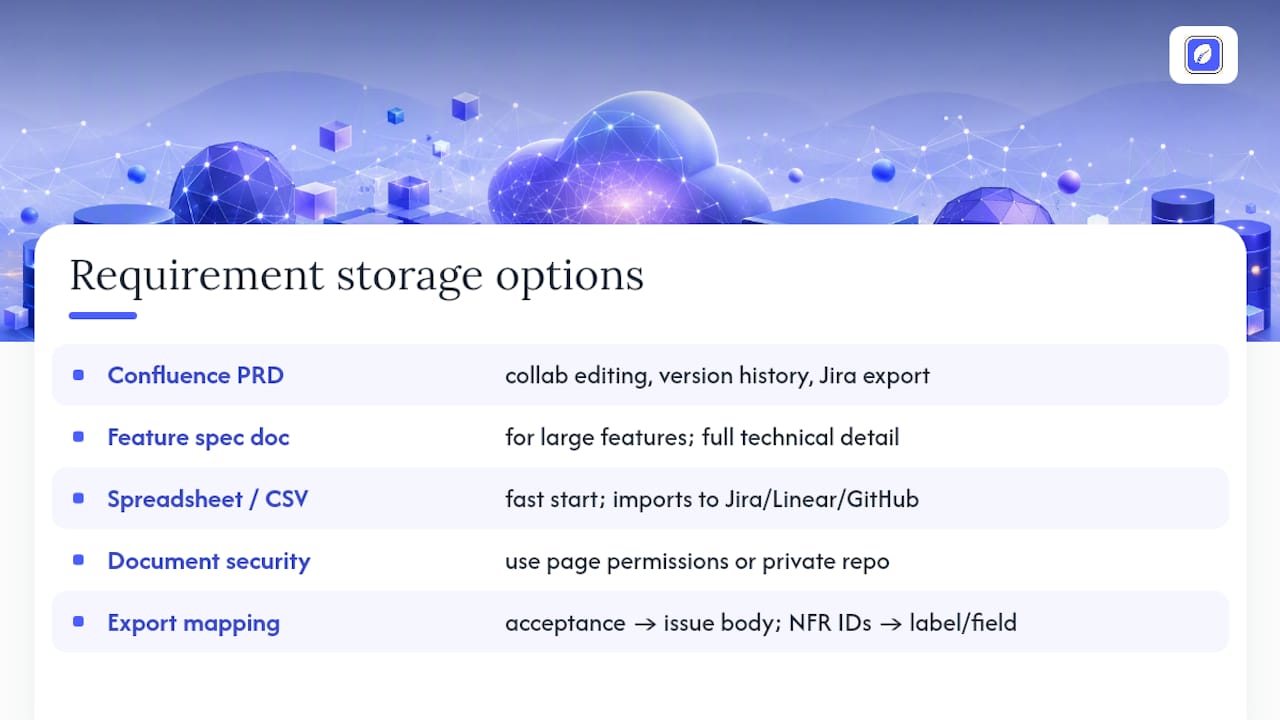
Atlassian Confluence PRD template is the most widely used storage target for US product teams. Confluence's product requirements templates support collaborative editing, version history, and inline comments — which means every change is attributed and reversible. The template maps directly to canonical PRD sections: problem statement, goals, personas, user stories, functional requirements, NFRs, dependencies, and milestones. Export to Jira is native; GitHub sync requires a third-party connector.
Single-feature spec doc works well for complex features that need their own space: a payments integration, an API redesign, or a new onboarding flow. The SampleYogi feature spec template covers user stories, Given/When/Then criteria, technical approach, API changes, data model changes, error handling, edge cases, and a rollout plan. Use it when a feature is too large for a single PRD row.
Spreadsheet or CSV is the fastest way to get started and the easiest import format for Jira, Linear, and GitHub Issues. Keep columns aligned to the canonical schema (ID, title, user story, acceptance criteria, NFR IDs, priority, owner, test owner, estimate, dependencies, metric, status). Export the CSV and import directly into your issue tracker.
For document security when storing requirements that include API keys, data model details, or PII handling specs, use Confluence's page-level permissions or a private GitHub repo with branch protection — not a shared Google Doc with "anyone with the link" access.
Pro Tip: When exporting to Jira or GitHub Issues, map the "acceptance criteria" field to the issue description body and the "NFR IDs" to a label or custom field. This keeps traceability intact across tools without manual re-entry.
How should you prioritize features on the requirements list?
Prioritization is where most feature lists go wrong. MoSCoW (Must-Have, Should-Have, Could-Have, Won't-Have) is a useful label system, but it collapses under pressure — everything becomes Must-Have when stakeholders are in the room.
A scoring model that combines Value, Confidence, and Effort (VCE) gives you a defensible, numeric ranking.
How to score
- Value (1–5): How much does this feature move the primary success metric? Score 5 for direct revenue or retention impact; score 1 for a nice-to-have.
- Confidence (1–5): How certain are you that the value estimate is correct? Score 5 for validated user research; score 1 for a founder assumption with no data.
- Effort (1–5, inverted): How much engineering effort does this require? Score 5 for a one-day task; score 1 for a multi-sprint epic.
Priority score = (Value × Confidence) / Effort
Worked example
| Feature | Value | Confidence | Effort | Score |
|---|---|---|---|---|
| Guest checkout | 5 | 4 | 3 | 6.7 |
| Social login | 3 | 3 | 2 | 4.5 |
| Dark mode | 2 | 5 | 4 | 2.5 |
Guest checkout scores highest and ships first. Dark mode scores lowest despite high confidence — the value simply does not justify the effort at this stage.
Pro Tip: Use the Confidence score as a gate for high-Value, low-Confidence items. Instead of building a feature you are not sure about, convert it into a two-week experiment: a prototype, a smoke test, or a fake-door test. If the experiment validates the value assumption, re-score and schedule it. This is the fastest way to avoid spending five sprints on a feature nobody uses.
What actually makes a feature requirements list work in practice
Most teams treat the feature requirements list as a document. The teams that ship reliably treat it as a protocol — a shared agreement about what "ready" means before a feature touches engineering.
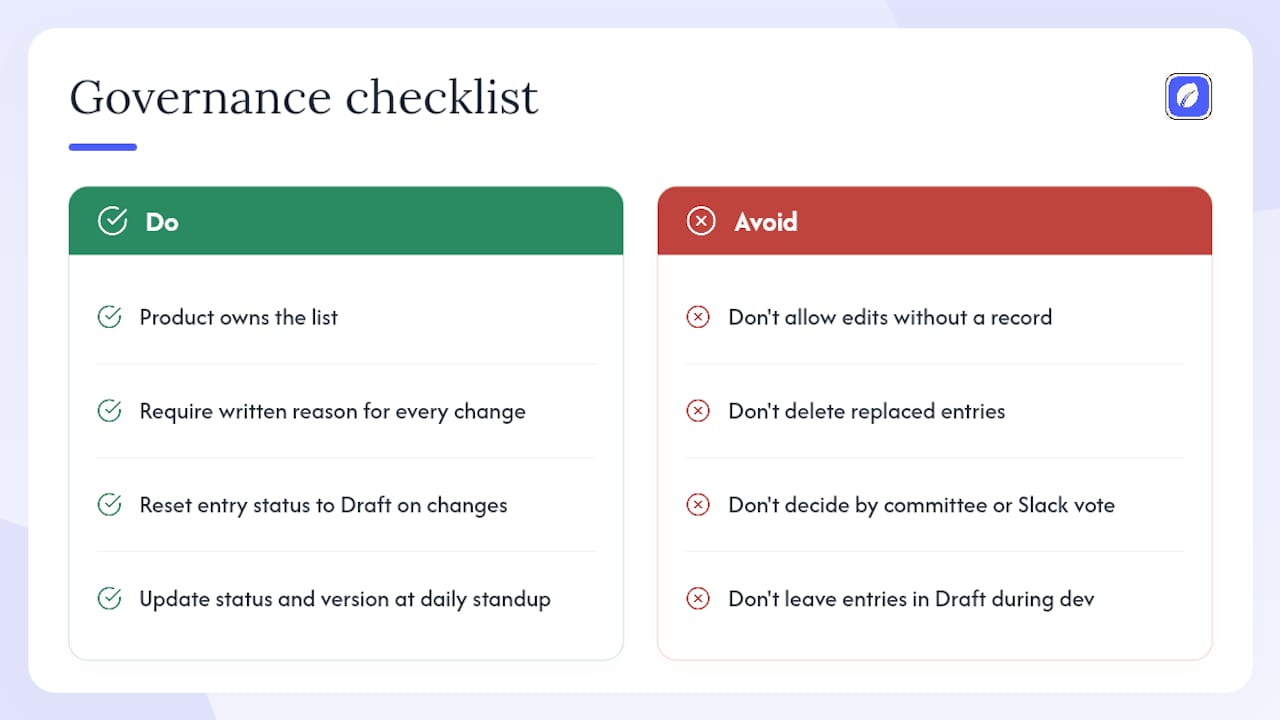
The governance question is simpler than it sounds: one person owns the list, and changes require a written reason. Not a committee, not a Slack vote. When anyone can edit any entry without a record, the list drifts. When a change requires a one-line note in the "version history" field and a status reset to Draft, the list stays honest. Archive replaced entries rather than deleting them — a deleted requirement is a lost decision, and decisions have a way of resurfacing six months later when a new engineer asks why something works the way it does.
For small teams running two-week sprints, the lightest governance that works is: product owns the list, tech lead reviews estimates and dependencies, QA owns the acceptance criteria and test owner fields, and the whole team signs off during grooming. That is four people, one meeting per sprint, and a clear handoff protocol.
Cross-team release boards need more structure: a change-control window (no new entries after sprint N-1), a named release owner who holds the freeze, and a shared Confluence page that shows the current status of every in-flight entry. The Kano model is useful here for separating "basic expectations" (must ship or users complain) from "delighters" (nice to have, high satisfaction impact) — it gives the release owner a principled reason to cut a feature without a political argument.
The single most common failure mode is not bad requirements. It is requirements that were good at the time of writing and were never updated. A feature entry that says "Draft" three weeks into development is a signal that something changed and nobody recorded it. Build the habit of updating status and version fields as a condition of the daily standup, not as a retrospective cleanup task.
Klaritea turns a one-line idea into a structured feature list
Most founders write requirements after they have already started building. By then, the scope has drifted, the dependencies are invisible, and the acceptance criteria are whatever the engineer assumed.
Klaritea flips that sequence. You type a one-line idea, and Klaritea's AI advisory board — Maya (marketing), Devon (business), and Priya (ops and QA) — builds a connected model that includes your ICP, feature map, and a structured requirements list with fields, acceptance criteria, and NFR stubs already populated. The Build lens outputs a feature spec you can export directly to Confluence or Notion (Pro), or sync to GitHub (paid). No blank template to fill from scratch, no grooming session to define what "done" means.
For founders who want to avoid spending $15K on an app that ships the wrong thing, Klaritea's connected planning model is the fastest path from idea to a requirements list your engineer can actually build from. Start with the free tier and export your first feature spec today.
Sources
Short, vetted starting points for building your own feature requirements list:
- Functional requirements examples and templates - Jama Software
- Non-Functional Requirements: Examples & Templates
- Feature Spec Template - SampleYogi
FAQ
What are feature requirements?
Feature requirements are structured, testable descriptions of what a software feature must do (functional) and how well it must perform (non-functional). Each entry links a user story to acceptance criteria, an owner, and a success metric.
What is a requirements checklist?
A requirements checklist is a short list of mandatory fields every feature entry must include before it enters development — typically ID, user story, Gherkin acceptance criteria, NFR IDs, priority, owner, test owner, estimate, dependencies, and a success metric.
How do you write a list of requirements?
Start with a user story for each feature, add at least two Given/When/Then acceptance criteria, attach measurable NFR IDs, assign an owner and a test owner, estimate effort, and record the success metric. Move entries from Draft to Approved through a structured review with product, engineering, and QA.
What are the steps in requirement analysis?
Requirement analysis typically follows six steps: capture the idea, identify the user and persona, write the user story, add acceptance criteria and NFRs, add dependencies and estimates, then review and sign off with all stakeholders before the entry enters a sprint.
How does Klaritea help with feature requirements?
Klaritea takes a one-line product idea and generates a structured feature list with user stories, acceptance criteria, and NFR stubs, then exports it to Confluence, Notion, or GitHub so teams can move from idea to engineering-ready spec without starting from a blank page.