
An acceptance testing plan is the documented agreement that tells everyone how business stakeholders will validate a release before it ships. Its core deliverable is a sign-off record: named approvers, pass/fail metrics, and measurable exit criteria that leave no room for a last-minute argument about whether the software is done. QA leads, business testers, and project managers all work from this one document.
TL;DR:
- UAT should only start after system and integration tests pass to avoid wasting business testers' time on engineering-identified bugs.
- A UAT plan must include clear, measurable entry and exit criteria to prevent delays and scope creep during testing cycles.
- Test cases should directly trace back to business workflows and requirements, with detailed preconditions, steps, and expected outcomes for clarity.
- Preparing or controlling the test environment and data is critical; uncontrolled changes can invalidate re-testing efforts and delay sign-off.
- Sign-off requires specific pass/fail metrics and documented approvals to avoid disputes and ensure a thorough, accountable validation process.
Table of Contents
- What UAT Covers and When You Actually Need a Formal Plan
- Core Sections Every Acceptance Testing Plan Must Include
- How to Write UAT Test Cases That Trace Back to Requirements
- Preparing the Environment and Test Data for Reliable Validation
- Running Execution, Triaging Defects, and Reporting Progress
- Sign-Off, Deliverables, and the Post-UAT Retrospective
- Copy-Ready UAT Plan Skeleton and Checklist
- Karl's Practical Perspective: Common Failures and Quick Fixes
- Let Klaritea Draft Your UAT Plan Before You Write a Line of Code
- Downloadable Templates and Authoritative Guides
- Sources
- FAQ
What UAT Covers and When You Actually Need a Formal Plan
User acceptance testing checks whether delivered software matches real business requirements and real workflows, not just whether the code runs without errors. That distinction separates it from QA and system testing, which confirm the software works as built. Acceptance testing specifically determines whether a system meets the requirements of a specification or contract, and it sits at the very end of the testing chain for a reason.
Here's how the layers stack up:
- Unit and integration testing: confirm individual components and their connections function correctly.
- System testing: verifies the whole application behaves as designed, end to end.
- QA testing: catches bugs against technical specifications, usually run by testers who did not write the requirements.
- UAT: confirms the software solves the actual business problem, run by the people who will use it.
Schedule UAT only after system and integration tests pass. Running it earlier wastes business testers' time chasing bugs that engineering should have caught first.
Core Sections Every Acceptance Testing Plan Must Include
A UAT test plan needs a fixed set of sections, in a fixed order, or reviewers end up hunting for information that should have been obvious. Here's the sequence that holds up across most projects:
- Project overview and objectives, tied directly to requirement or user story IDs so nobody has to guess what "done" means.
- Scope, spelled out as explicit in-scope and out-of-scope items. Vague scope is where scope creep starts.
- Entry criteria, the measurable conditions that must be true before UAT can begin (system testing complete, environment stable, test data loaded).
- Exit criteria, the measurable conditions that must be true before UAT can end (pass rate thresholds, defect counts).
- Roles and responsibilities, with named individuals, not job titles, next to each approval, a topic well covered in the Dual Agile Pack: Scrum Master & Product Owner Certification! – GetVoucher program.
- Schedule, including planned cycles and a built-in window for retesting fixed defects.
Pro Tip: Draft the plan while requirements are still being finalized, not after development wraps. Entry and exit criteria are far easier to negotiate before a deadline is bearing down on everyone in the room.
Skipping entry and exit criteria is the single most common reason UAT cycles run over budget and past their deadline.
How to Write UAT Test Cases That Trace Back to Requirements
A UAT test case needs to be readable by someone who has never opened a code editor. That means writing it around a business workflow, not a technical function. Each case should include:
- A unique ID and a one-line objective.
- Preconditions (account state, permissions, existing data).
- Numbered steps written in plain language.
- The specific data used to run the test.
- The expected result stated as a fact, not a hope.
- A field for evidence: screenshot, log entry, or exported record.
Start from real business workflows and slice them by how critical they are. A checkout flow gets more test cases than a rarely used settings page. Every case should map to a line in your requirements traceability matrix, so sign-off can prove coverage rather than assert it.
Here's a quick example: for an online refund request, a test case might set preconditions as "logged in customer with a completed order," steps as "navigate to order, select refund, submit reason," and expected result as "refund status changes to pending within one business day."
Preparing the Environment and Test Data for Reliable Validation
An environment that does not mirror production makes every result suspect. Before UAT starts, confirm that the following match production as closely as possible:
- Third-party integrations (payment gateways, email services, shipping APIs).
- Hardware and device configurations testers will actually use.
- Supported browsers and their current versions.
- User permission levels and role based access.
Test data deserves the same rigor. Anonymized production data catches edge cases synthetic data misses, but it comes with privacy obligations you cannot skip. Synthetic data is safer and faster to generate, though it sometimes misses the messy irregularities real customer records contain. Most teams end up blending both.
Pro Tip: Lock the environment once execution begins. Uncontrolled changes mid-cycle, a config tweak, a data refresh, are one of the fastest ways to invalidate a week of testing.
Restrict environment access to the testers and administrators named in the plan. An open environment invites untracked changes that nobody can explain later.
Running Execution, Triaging Defects, and Reporting Progress
Execution should follow a rhythm: run the case, log the result, capture evidence, move on. A structured UAT process treats defect logging as seriously as the test cases themselves. Every defect report needs:
- Exact reproduction steps.
- Screenshot or video evidence.
- Frequency (does it happen every time, or intermittently?).
- Business impact, stated in terms a non-technical approver understands.
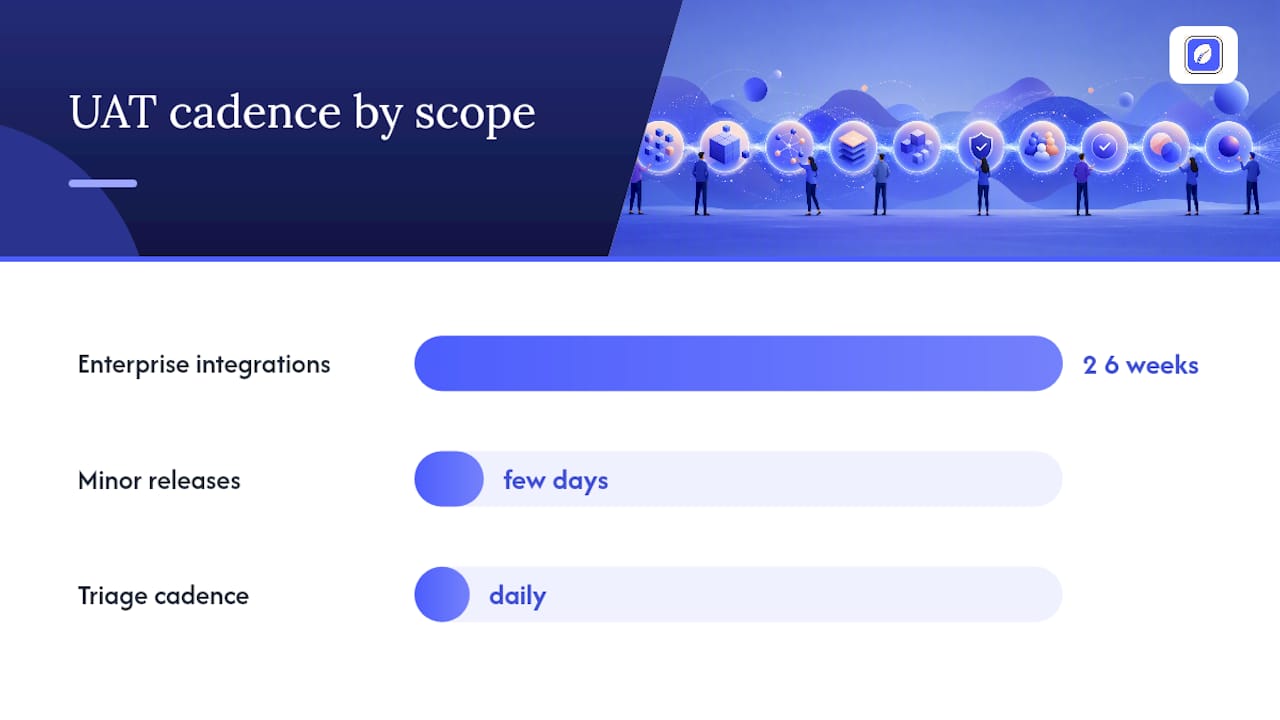
Severity should map to business impact, not developer convenience. A cosmetic bug on a rarely used screen is low priority even if it looks bad; a broken checkout step is critical even if the fix is trivial. Triage daily, with one named owner deciding what gets fixed before retest and what gets deferred.
UAT cycles for large enterprise integrations typically run two to six weeks, while minor releases can wrap in a few days. Daily summary reports should track cases executed, pass/fail counts, and open defects by severity, so nobody discovers a problem for the first time at sign-off.
Sign-Off, Deliverables, and the Post-UAT Retrospective
The sign-off record is the actual proof that stakeholders reviewed and approved the release. It should include:
- Total test cases executed versus planned, with pass/fail counts.
- A list of deferred defects and the business justification for deferring each one.
- Named approvers with dated signatures, not a generic "approved" checkbox.
Set exit criteria as specific numbers, not adjectives. "Ninety-five percent of executed test cases passed, with zero open critical defects" leaves nothing to argue about later. "Most tests passed" invites a dispute the week before launch.
Once sign-off is done, run a short retrospective. Thirty minutes is usually enough: what caused delays, which defects should have been caught earlier, what the next plan should change. Feed that directly into your next cycle's entry criteria.
Copy-Ready UAT Plan Skeleton and Checklist
Paste this ten-section skeleton into Confluence, Word, or your test management tool and fill in each block:
- Project overview and objectives
- Scope (in and out)
- Entry criteria
- Exit criteria
- Roles and responsibilities
- Test environment and data
- Test case inventory
- Defect management process
- Schedule and cycles
- Sign-off record
| Checklist item | What to verify |
|---|---|
| Entry criteria met | System testing complete, environment stable |
| Environment ready | Integrations, permissions, and data loaded |
| Test cases mapped | Every case traces to a requirement ID |
| Triage cadence set | Daily owner assigned for defect review |
| Sign-off drafted | Named approvers and measurable exit criteria listed |
Adjust thresholds and timelines to project size.
Karl's Practical Perspective: Common Failures and Quick Fixes
Most UAT delays trace back to three things: vague exit criteria, business testers recruited too late, and a plan written after development already finished. Fix the first by writing numbers into your criteria, not adjectives. Fix the second by identifying power users during requirements gathering, not the week before testing starts, and giving them a one-page brief instead of a full spec. Fix the third by drafting the plan alongside requirements. Every team that waits until "code complete" to write its UAT plan ends up negotiating scope under deadline pressure, and that's when disputes happen.
— Karl
Let Klaritea Draft Your UAT Plan Before You Write a Line of Code
Building the plan skeleton above by hand takes a few hours if you know exactly what belongs in each section. Klaritea skips that step entirely: because it builds a connected model of your business, requirements, and features from a single idea, it can generate a mapped test plan and exportable templates directly from the features and stories already in your model, instead of starting from a blank document.
That means your requirements traceability, scope, and test case inventory are already linked before you write a single test step, and you can export the result to Notion or Confluence on the Pro plan. If you want to see how the connected model works before committing, the Klaritea approach walks through it in detail. Ready to try it? The Klaritea plan starts at $19 a month, with a free tier available if you just want to see your first plan take shape.
Downloadable Templates and Authoritative Guides
For a canonical starting point, Princeton's UAT test plan template lays out standard sections in a ready-to-use format. Wikipedia's overview of acceptance testing covers the full taxonomy, including operational acceptance testing. For step-by-step execution guidance, Katalon's UAT guide and BesTest's plan generator both offer practical, downloadable starting points.
Sources
- User Acceptance Test Plan - PATCO - Princeton University
- Acceptance testing
- Free UAT Test Plan Generator (Word, Markdown, PDF) | BesTest
FAQ
What Are the Four Types of Acceptance Testing?
The main types are user acceptance testing (business validation), operational acceptance testing (checking backups, security, and maintenance procedures), contract acceptance testing (verifying contractual criteria are met), and regulatory acceptance testing (confirming compliance with legal standards), as Wikipedia's taxonomy outlines.
What Is the Difference Between FAT and UAT?
Factory acceptance testing (FAT) happens at the vendor's site before delivery, typically for hardware or manufactured systems, while UAT happens after delivery, at the customer's site, and focuses on whether the software fits real business workflows.
Can You Give an Example of an Acceptance Test?
A simple example: for a password reset feature, the test case sets preconditions as "user has a registered account," steps as "request reset, open email, set new password," and expected result as "user can log in immediately with the new password."
What Is Acceptance Testing?
Acceptance testing determines whether a finished system meets the requirements of a specification or contract, and it is the last testing stage before a business signs off on release.
Does Klaritea Help Create a UAT Plan?
Klaritea generates a connected plan structure, including requirements mapping and exportable test plan templates, built from the features and stories already defined in your business model.